Set up the garments you actually sell once — then every mockup, order and bill uses them automatically.
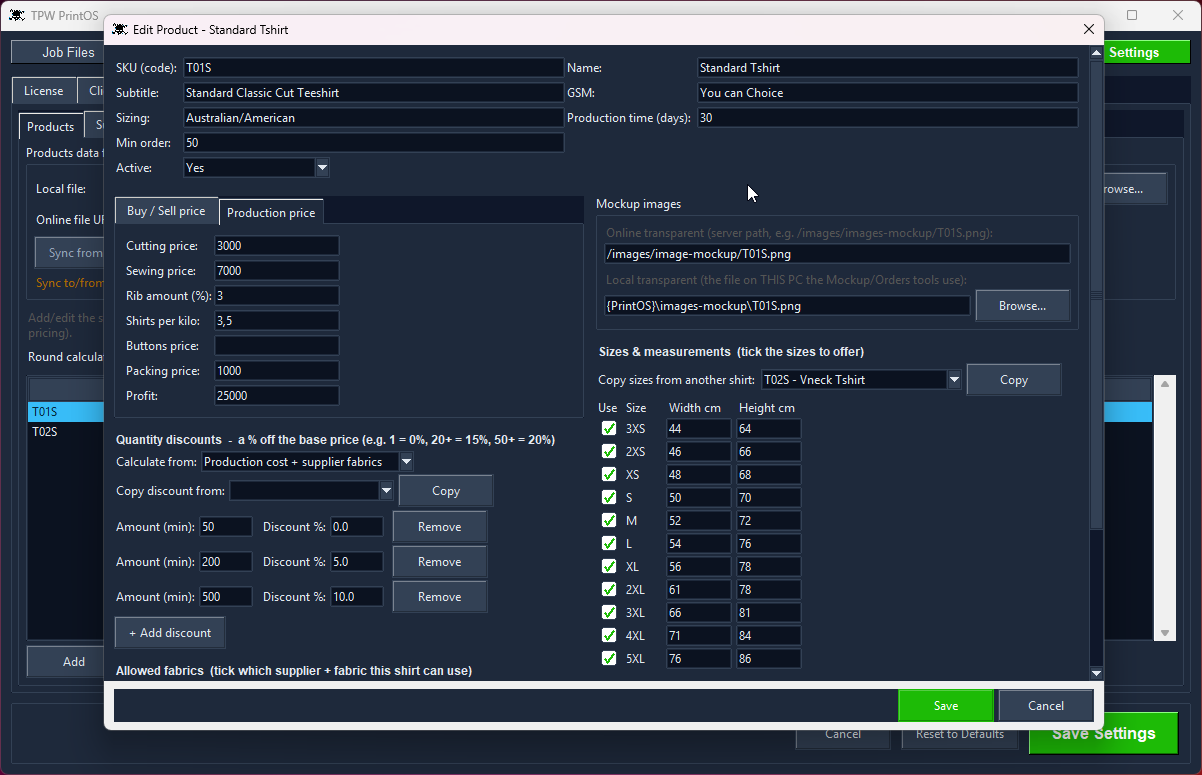
Your own products, styles and size runs.
Your prices live in your head, a spreadsheet, and a WhatsApp message from your fabric supplier in March. Then someone asks what a 50-piece run costs and you do the sum again.
PrintOS keeps your actual catalogue: every product with its SKU, sizes and real measurements, mockup images, printing areas, allowed fabrics and quantity discounts. Set it up once and every other tool — mockup, orders, billing, gang sheet — uses it.
Some shirts you buy and sell: enter the buy price and the sell price and you're done. Others you make — so PrintOS works the price out from cutting, sewing, rib, buttons, packing and your margin, plus the fabric for the colour on the order, divided by how many shirts you get out of a kilo. Rib is a percentage of the fabric. Change a supplier's price per kilo and every quote follows.
Quantity discounts apply themselves, and prices round up to numbers that look right in your currency — 78,543 becomes 79,000; $6.89 becomes $7.
Each supplier, the fabrics they sell, and every colour with its own code, swatch and price. Price a fabric per colour, or one price for the lot. Because the structure matches reality, PrintOS knows which supplier a colour code belongs to — so it can total a bill's fabric and rib in kilos, group it by supplier and hand you the WhatsApp message. No mapping table to keep in step.
It's all plain JSON and SQLite on your own machine. Read it, back it up, or build your own website on top of it. Nothing is encrypted or locked away from you.
Every garment you sell, with the details your shop actually needs.
Track which supplier and fabric each product can be made from.
Tick the sizes you offer and set width and height per size.
Point each product at its own transparent mockup image.
Price and bill in your currency, not a hardcoded one.
Switch the interface language for your market.
Nested the way it really is: each supplier, the fabrics they sell, and every colour with its own code and price.
PrintOS works out the fabric and rib kilos for a bill and groups them by supplier, ready to send on WhatsApp.
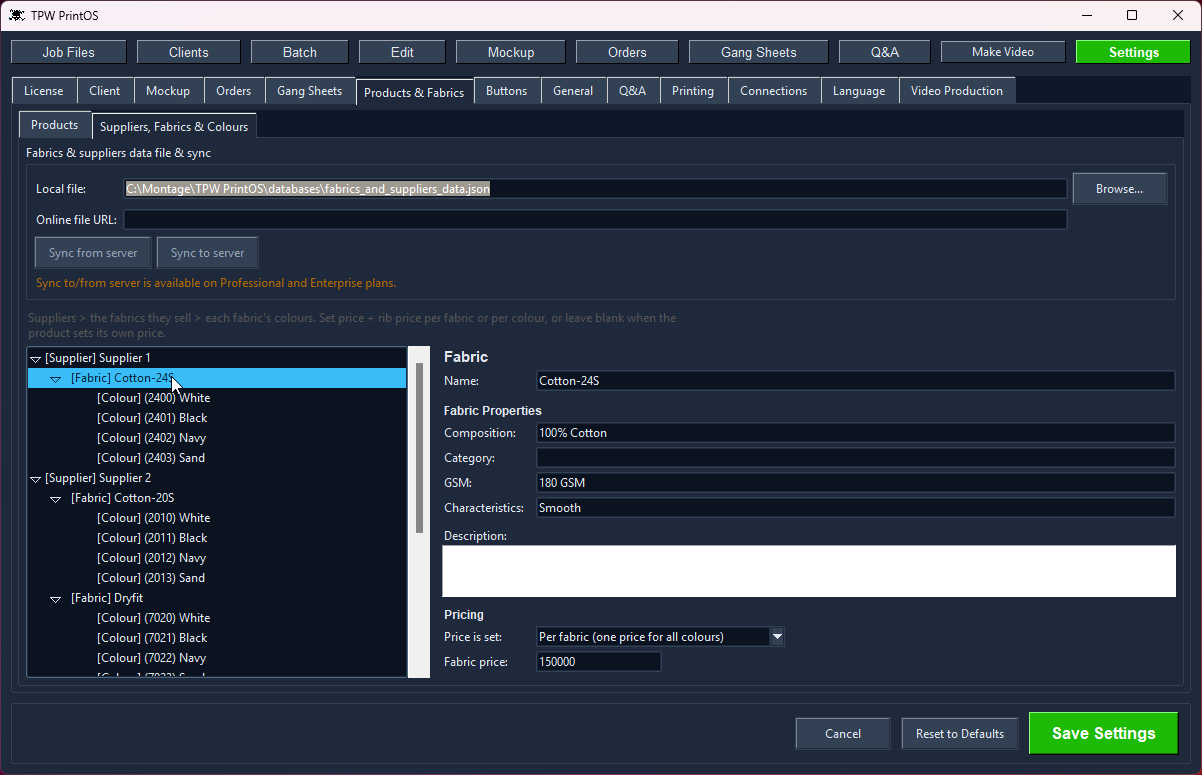
Your fabric suppliers, and what each one charges by the kilo.
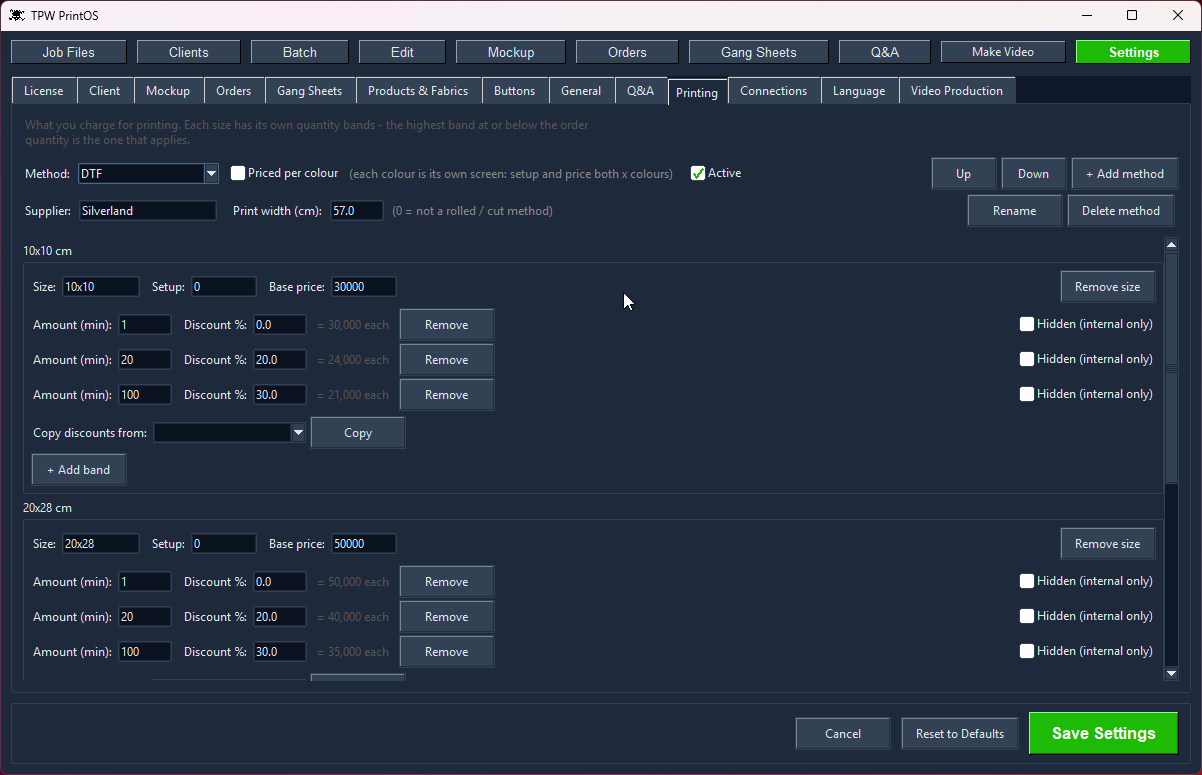
Your printing prices, per method and quantity.
The local databases are plain, unencrypted SQLite files sitting in your PrintOS folder. Open them with any SQLite tool, back them up by copying the file, or read them from your own code.
No. PrintOS is a one-time licence. You buy it once and keep it — there's no expiry and no monthly fee.
Updates are free too: download the latest version whenever you like.
It depends on your edition:
Extra computers are US$199 each, any time. A licence covers computers within your own company or location.
Yes. Nothing is locked away.
PrintOS stores your clients, orders and designs in ordinary SQLite databases in its own folder. They're not encrypted and they're not in a secret format — open them with any SQLite browser, query them, or point your own code at them.
So if you want to build your own website, customer portal or reporting system on top of your data, you can. It's your data. Back it up by copying a file, and if you ever stop using PrintOS, you still have everything.
Two things: what you pay, and what you get.
You buy it once. There's no monthly fee and no annual renewal — a one-time licence from US$199, and updates are free. Stop paying and nothing switches off, because there's nothing to stop paying.
It's the whole shop, not just sheets. Gang sheet tools build gang sheets. PrintOS also files your client artwork, crops it, removes backgrounds, mocks it up on the garment, takes the order, makes the bill, and cuts the social video — all sharing one client, so you never re-type a name.
And you get 30 days to try all of it, not 7.
Yes. PrintOS records the cost side as you work: fabric and rib in kilos for shirts you make, the buy price for ones you bring in, and the DTF film off the roll for every gang sheet.
The Reports screen totals it month by month — shirts, revenue, cost, profit, fabric kilos, film centimetres and average ink coverage — and exports to CSV for your accountant.
Local Edition is 1 computer, Professional 3, Enterprise 5 — and you can add more at $199 each, any time, within your own business.
Each computer activates against your licence, and you can free a machine again when you replace it.
Every design and production tool is in both — gang sheets, mockups, crop, background removal, orders, billing and video.
Professional adds online sync: clients, orders, designs and client files shared between machines through your own database and server. Local Edition keeps everything in its local database on one computer.
Every tool shares one client, so the work flows from one to the next without re-typing anything.
Set your roll width, load the job, and get a print-ready gang sheet — nested tight, with e…
Drop a design onto a garment, pick the style and fabric colour, and send a clean preview —…
Colour remover and a magic wand you tune per RGB channel — click, apply, save. Ready to pr…
Batch-crop a client's entire folder at three sensitivities, or crop by hand with snap-to-c…
Log the job with style, fabric colour and design, fill the full size run, price it from yo…
A real client book with WhatsApp built in — and every design filed under the client it bel…
Pick the clips, tag the client, add music and an outro — then publish to TikTok, Instagram…
Open a bill and PrintOS totals the fabric and rib in kilos per supplier, or the shirts and…
Shirts, revenue, cost and profit by month - with fabric kilos, DTF film used and ink cover…
Every tool unlocked, no card, no account. Then buy it once — there's no subscription.