Pick the clips, tag the client, add music and an outro — then publish to TikTok, Instagram, YouTube or FTP in one click.
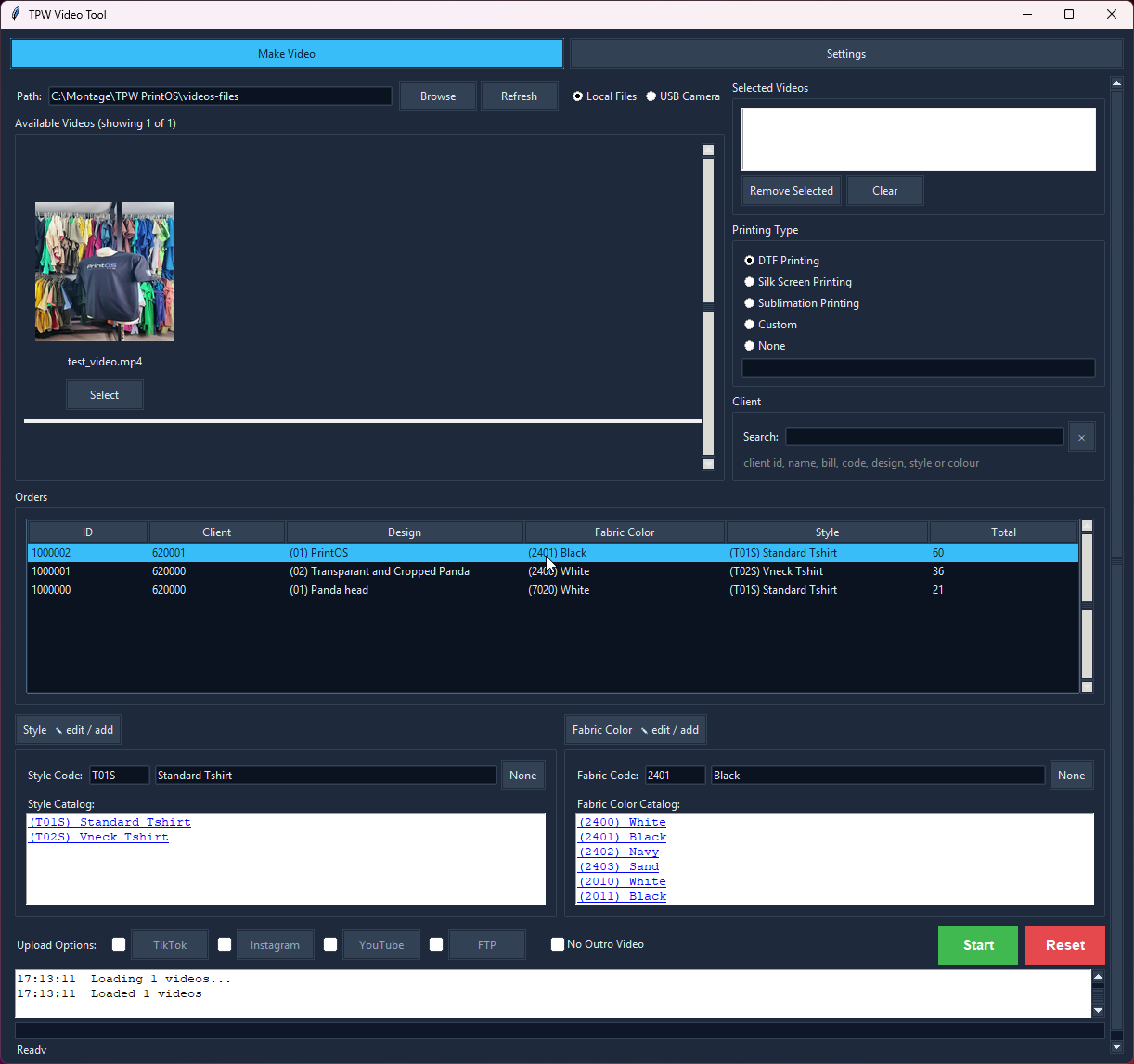
Pick clips, tag the job, publish — with the order details already loaded.
The shirt's done, it looks good, and the client should see it. So you open Premiere. Find the clips. Cut them. Drop the music in. Type the shirt name and the colour over the top — correctly, at 11pm. Find the outro. Render. Export. Upload.
Then you do it again for the next job.
Choose as many clips as you like — the front, the back, the detail shot — from a folder or straight off the camera when it's plugged in. Any quality: 4K, a phone clip, a re-encode. They're all matched to one vertical frame before they're joined, so mixing them doesn't break anything.
Type the client ID and their orders load from your own database — click one and the shirt style, fabric colour and design fill themselves in. No order for it yet? Pick straight from your product catalogue instead. Either way you can edit any of it by hand, because sometimes the client wants it called something else.
Pick the printing type you used — DTF, silk screen, or type your own — and it goes on the video with the rest.
Your track runs underneath, your logo sits in the corner, and your own outro clip is joined on the end with its own music. Set them once in Settings and every video you make matches, without thinking about it. Rendering uses your GPU when you've got one.
A .txt lands beside the video with the caption and hashtags already written from the order — design, style, colour, client and your product link. Open it, copy, paste. Then publish to TikTok, Instagram, YouTube or your own FTP without leaving the tool.
Everything lands in one output folder you choose, named for the client, the shirt and the design — so next month, when they ask for it again, it's right there.
Read clips from a USB camera or any local folder.
Auto-loads the client's recent orders, shirt names and colours.
Set a custom soundtrack and closing video once.
TikTok, Instagram, YouTube or FTP — tick and go.
Hardware-accelerated so exports don't hold up the shop.
Built for vertical social video, not repurposed landscape.
A .txt lands next to the video with the caption and hashtags built from the order - style, colour, design and client.
Yes. PrintOS includes a video maker built for print shops, not a general editor.
Pull the clips straight off your camera or a folder, and because PrintOS already knows the client, it loads their recent orders, shirt names and fabric colours for you — so the details are right without looking anything up. Add your music and outro, and publish to TikTok, Instagram, YouTube or your own FTP in one click.
Encoding is GPU-accelerated, so exports don't hold up the shop.
Every tool shares one client, so the work flows from one to the next without re-typing anything.
Set your roll width, load the job, and get a print-ready gang sheet — nested tight, with e…
Drop a design onto a garment, pick the style and fabric colour, and send a clean preview —…
Colour remover and a magic wand you tune per RGB channel — click, apply, save. Ready to pr…
Batch-crop a client's entire folder at three sensitivities, or crop by hand with snap-to-c…
Log the job with style, fabric colour and design, fill the full size run, price it from yo…
A real client book with WhatsApp built in — and every design filed under the client it bel…
Set up the garments you actually sell once — then every mockup, order and bill uses them a…
Open a bill and PrintOS totals the fabric and rib in kilos per supplier, or the shirts and…
Shirts, revenue, cost and profit by month - with fabric kilos, DTF film used and ink cover…
Every tool unlocked, no card, no account. Then buy it once — there's no subscription.