Set your roll width, load the job, and get a print-ready gang sheet — nested tight, with every design still in one piece.

Load a bill and every design arrives with its quantities, sizes and roll settings.
Ganging a sheet by hand in Illustrator is an hour you don't get paid for — and the online builders that do it for you will happily slice a design in half to save themselves a few centimetres of film.
PrintOS builds the sheet the way a shop does. Load a bill and every design on it arrives with its quantities already filled in. Give each one up to four size options, set your roll width and spacing, and watch the price per cm total the job as you go.
Best/Fast opens the box editor: every design becomes a labelled rectangle you can drag, rotate, duplicate or delete, with the cut lines drawn in. It auto-arranges the whole sheet with almost no gaps and justifies each row to the edges so there's room to cut. Nothing is rendered until you say so, so it's instant to work with.
Standard runs the fast auto-layout. Advanced tries every layout method and switches to a real alpha-channel search that nests filler images into the dead space inside another design's bounding box — between an octopus's tentacles, say. It's slower, and on a busy sheet it earns its keep.
The packer treats every design as one whole piece. If it doesn't fit, it moves — it never gets cut in two. A sliced print is scrap, and scrap costs more than film.
Cut the run into lengths, add registration markers, a CMYK colour bar, and the client ID and date. Filler images use up whatever's left. A summary file goes out with the sheet — and the centimetres and cost of the run are written back to the bill, so the film you burned shows up in your monthly report instead of evaporating into a folder name.
Load a bill and every design arrives with its quantities, ready to lay out.
Give each design up to four size options, each with its own width and count.
Set roll width and spacing so everything fits your material exactly.
Split the run into set lengths with margins, ready for your cutter.
Adds registration marks, a CMYK colour bar, and the client ID and date.
Price per centimetre in your currency, so job cost is always in view.
Drop small and large filler images into the gaps so no film goes to waste.
Open the box editor to rotate, duplicate, move or delete any piece by hand.
Best/Fast box editor, Standard auto-layout, or Advanced - which tries every method and nests fillers into dead space inside a design.
The centimetres and cost of every run are written back to the bill, so they show up in your monthly report.
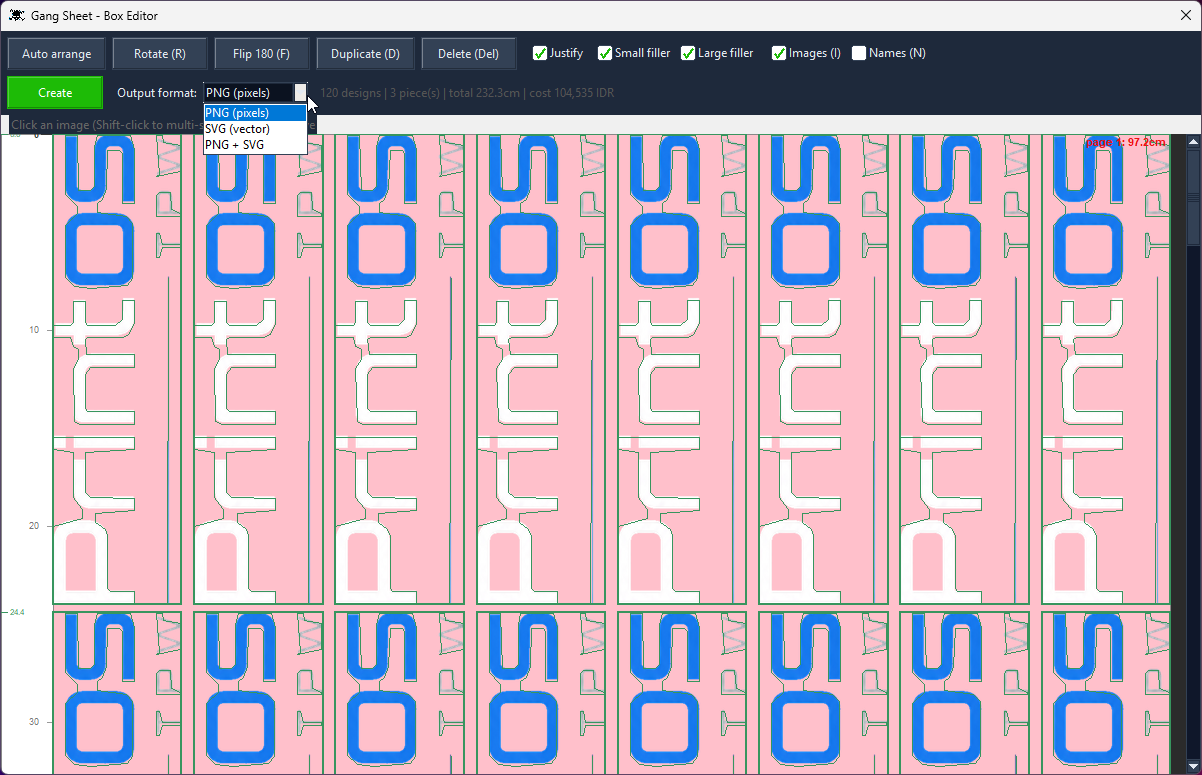
The box editor: 120 designs, 3 pieces, 232.3 cm — and output as PNG, SVG or both.
Never. The nesting engine packs the sheet tightly and fills gaps with filler images, but a design is always treated as one whole piece.
If something doesn't fit cleanly it stays too big rather than getting cut — because a sliced print is scrap.
Yes — and a bit more than most.
PrintOS builds DTF gang sheets from your designs: set your roll width and spacing, give each design its sizes and quantities, and it nests everything tight, cuts the run into lengths, and adds registration marks, a CMYK colour bar and the client ID and date.
Two differences worth knowing:
Two things: what you pay, and what you get.
You buy it once. There's no monthly fee and no annual renewal — a one-time licence from US$199, and updates are free. Stop paying and nothing switches off, because there's nothing to stop paying.
It's the whole shop, not just sheets. Gang sheet tools build gang sheets. PrintOS also files your client artwork, crops it, removes backgrounds, mocks it up on the garment, takes the order, makes the bill, and cuts the social video — all sharing one client, so you never re-type a name.
And you get 30 days to try all of it, not 7.
Every tool shares one client, so the work flows from one to the next without re-typing anything.
Drop a design onto a garment, pick the style and fabric colour, and send a clean preview —…
Colour remover and a magic wand you tune per RGB channel — click, apply, save. Ready to pr…
Batch-crop a client's entire folder at three sensitivities, or crop by hand with snap-to-c…
Log the job with style, fabric colour and design, fill the full size run, price it from yo…
A real client book with WhatsApp built in — and every design filed under the client it bel…
Pick the clips, tag the client, add music and an outro — then publish to TikTok, Instagram…
Set up the garments you actually sell once — then every mockup, order and bill uses them a…
Open a bill and PrintOS totals the fabric and rib in kilos per supplier, or the shirts and…
Shirts, revenue, cost and profit by month - with fabric kilos, DTF film used and ink cover…
Every tool unlocked, no card, no account. Then buy it once — there's no subscription.