Open a bill and PrintOS totals the fabric and rib in kilos per supplier, or the shirts and sizes for anything you buy in - ready to send on WhatsApp.
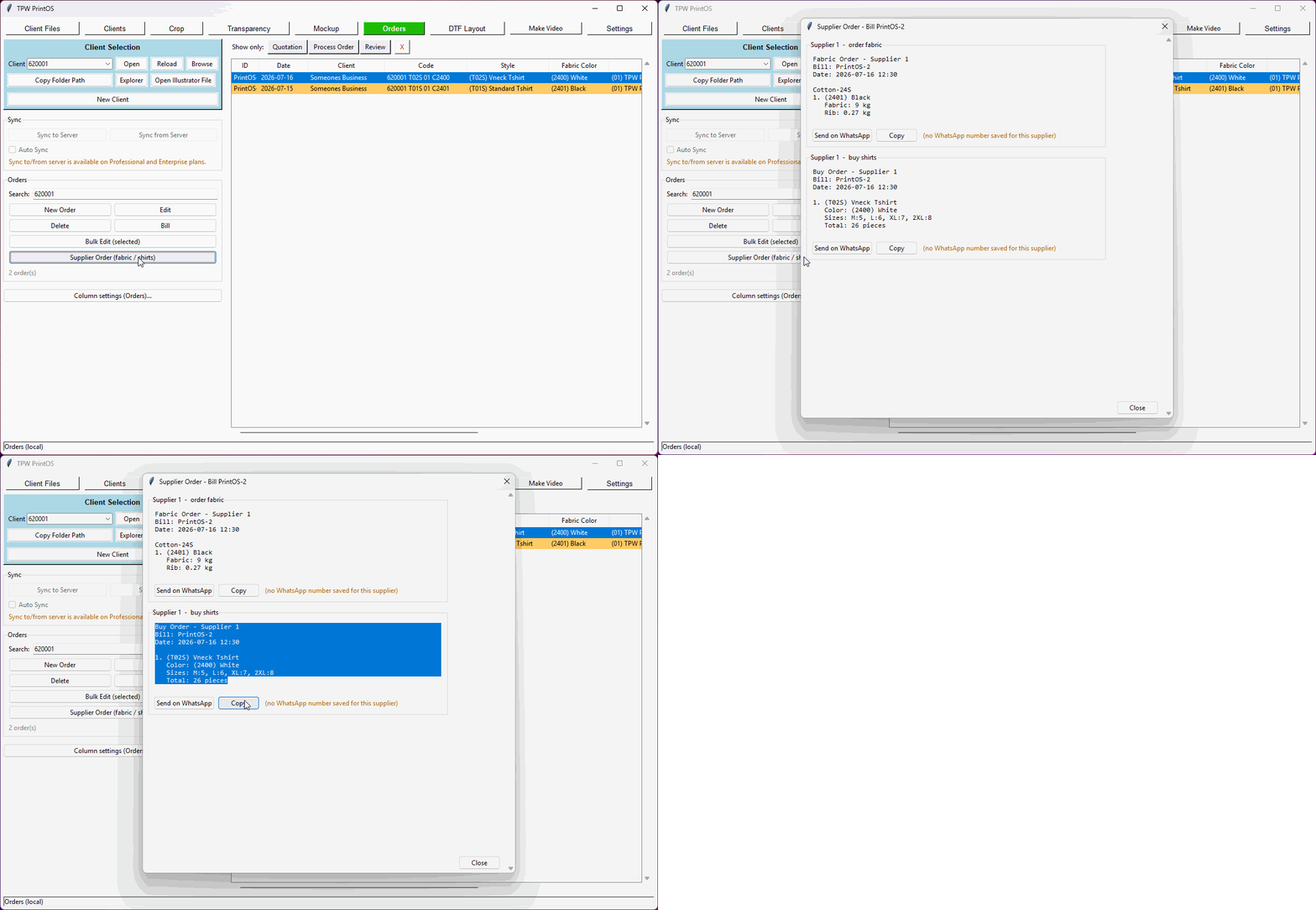
Fabric and rib per supplier, straight from the bill.
A bill comes in for 90 shirts across four colours and two styles. Now work out how many kilos of each fabric that is, how much rib, which supplier sells which, and type it all into WhatsApp without a mistake.
PrintOS does it from the bill. Open any order, hit Supplier Order, and it reads every line: the sizes, the style, the fabric colour. For shirts you make it works out the fabric — quantity divided by how many shirts you get from a kilo, rounded up to whole kilos, because that's how you buy it — then the rib as a percentage on top. For anything you buy in finished, it lists the styles, colours and the size run instead.
There's no pattern list to maintain, no mapping table to keep in step with reality. Your fabrics are already stored the way they really are — each supplier, the fabrics they sell, and every colour with its own code. So a colour code on an order is the link to the supplier. Add a colour, and it just works.
Each supplier gets their own block with the message already written, a WhatsApp button that opens the chat with it filled in, and a Copy button for everything else. Anything that can't be worked out — a missing shirts-per-kilo, a colour that isn't in your fabrics yet — is listed at the bottom rather than quietly left out of the order.
Every line on the bill, not one order at a time.
Fabric and rib per colour, rounded up to whole kilos - how you actually buy.
Fabric for what you make; shirts and sizes for what you buy in finished.
One block per supplier, because that's one message each.
Opens the chat with the order already written. Or copy it anywhere.
Missing data is listed, not skipped - so you don't under-order.
In this video, I demonstrate the complete production workflow inside TPW PrintOS , from a finished t-shirt mockup to a production-ready DTF print layout. The workflow includes:
3XS through 5XL, with a live total as you type. Every size is on one screen — no scrolling through sizes nobody orders.
It works out what to order and who from. Open a bill and PrintOS totals the fabric and rib in kilos per colour — rounded up to whole kilos, because that's how you buy it — or lists the shirts and sizes for anything you buy in finished.
It's grouped by supplier with the message ready to send on WhatsApp. It knows which supplier sells which fabric from your own data, so there's nothing extra to configure.
Every tool shares one client, so the work flows from one to the next without re-typing anything.
Set your roll width, load the job, and get a print-ready gang sheet — nested tight, with e…
Drop a design onto a garment, pick the style and fabric colour, and send a clean preview —…
Colour remover and a magic wand you tune per RGB channel — click, apply, save. Ready to pr…
Batch-crop a client's entire folder at three sensitivities, or crop by hand with snap-to-c…
Log the job with style, fabric colour and design, fill the full size run, price it from yo…
A real client book with WhatsApp built in — and every design filed under the client it bel…
Pick the clips, tag the client, add music and an outro — then publish to TikTok, Instagram…
Set up the garments you actually sell once — then every mockup, order and bill uses them a…
Shirts, revenue, cost and profit by month - with fabric kilos, DTF film used and ink cover…
Every tool unlocked, no card, no account. Then buy it once — there's no subscription.